




Never miss a deal: Follow us on the DansDeals App, WhatsApp, X, Telegram, Instagram, Facebook, SMS, or our Daily Email Digest.
Links may pay us a commission. We appreciate your support! View our advertiser and editorial disclosure here. The content on this page is accurate as of the posting date; however, some of the offers mentioned may have expired.
Amazon used to send subscribe and save items out right away. Recently they started only sending them out once a month.
For example take a case of 160 Pampers Size 4 Cruisers. The Amazon price is $46.99 less the $2 coupon. With Amazon Mom the subscribe and save price is $37.59 less the the $2 coupon.
However on my account at least it says “Add to your next monthly Subscribe & Save delivery: Feb. 16” so it will be more than a month until I actually get the diapers.
The solution though is actually quite simple. Place the order for the diapers. Then just click here to manage your subscriptions.
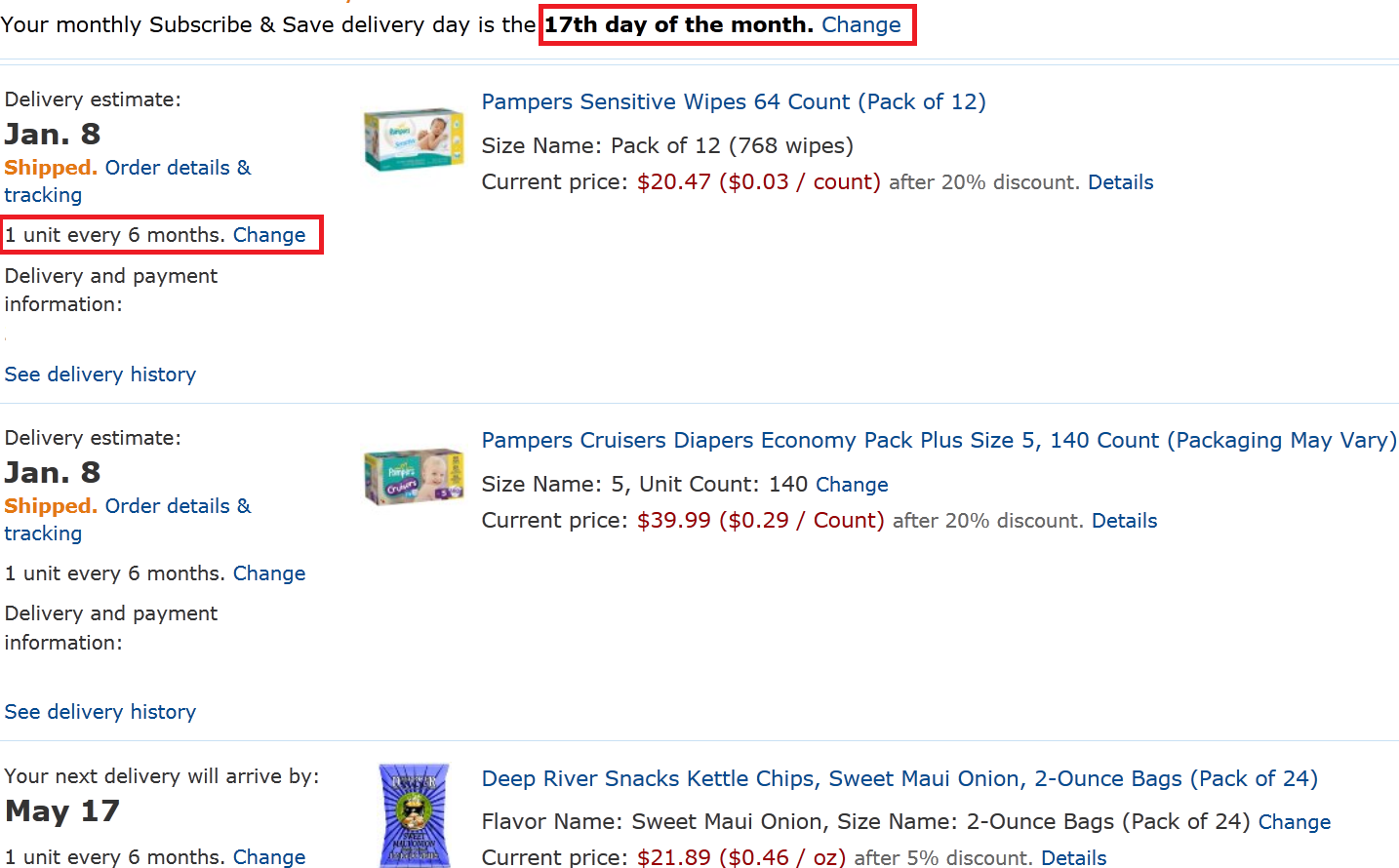
On the left of the item it will say, “1 unit every 6 months. Change ” However if you click on change it will not let you change the month to anything earlier than February.
At the top of the page however it says, “Your monthly Subscribe & Save delivery day is the 16th day of the month. Change ”
Change this day to the 17th (or any day that is at least 7 days from now).
Then go back to “1 unit every 6 months. Change ” January will now be an option and you’ll have your diapers within a week.
You can change the dates as often as you’d like!
Amazon offers free shipping with $35+ orders or get free next-day shipping on all orders with a free trial of Amazon Prime. Prime members can share benefits with a Household member here, allowing them to double up on Amazon Prime promos! A 6 month trial and discounted Prime membership is available with Amazon Student. EBT/Medicaid Cardholders can save on Prime Membership here.


Leave a Reply
83 Comments On "How To Expedite An Amazon Subscribe And Save Item"
All opinions expressed below are user generated and the opinions aren’t provided, reviewed or endorsed by any advertiser or DansDeals.
Ty! I hope this works, been such a hassle with their new rules.
@Isaac:
Try it out and post the results
It works for me and some DDF members though some people reported that it didn’t work for them.
amazon actuallycadvised me so lately
Thanx Dan I like these kind of stuff.
BTW what happened to a Dans Deals App?
Thanks. I think I’ll do that.
thanks Dan for this info. but if you need the item faster you can try your luck with calling,emailing, or chatting with a amazon csr. i have gotten them to give me a “one time” courtesy of having the item ship with one day shipping right away…on more then one occasion. all they asked me to do is make a new regular order or “get extra delivery” order and they manually changed it to the s&s price and one day shipping at no extra cost.
Nice!! How in the world did you figure this out!
@dan. Where’s my ht
Wow thanks worked wounderful
I know it would only be so long till a solution was posted here. Thanks!
Awesome! Thanks Dan!
I kept on making new accounts
tried it already before I saw it posted here, didn’t work for me -and if u ask for an additional shipment this month-it x have the subscribe and save discount!
@kracked dude:
Some people have been banned from Amazo for asking for too many handouts. I think my way is safer.
@Yossi.:
Played around with it when it came out. I thought it was obvious until yesterday when I learned many DDF’ers were struggling with it, hence the post.
@Puddles:
I hope you’re joking.
You asked on DDF if there was any way to get around this without calling them and I told you exactly what to do.
how do you get the $2 coupon to be applied?dont see an option for that on my acct
@momma:
It’s on the product page, “Save $2.00 with this Coupon”
@Dan i should’ve been more clear.I did not ask for any handouts what I did do is complain about their new policy of sending out s&s shipments once a month if I need the item right away. it was the amazon CSR that brought up the “one time”courtesy. dunno why anyone would get banned for that.
You won’t get banned for a one-time courtesy, but if you harass them for too many one-time courtesies or make too many returns they have banned people.
please clarify better. you can make unlimited returns what dan is referring to is users who return things to amazon and when selecting the reason they click defective, or missed delivery promise..or any other reason that puts the blame on them. If you simply be honest and select no longer needed or wanted. you will pay for return shipping but wont get banned.
got it! I didnt have the shipper selected from Amazon.com.. thats why it wasnt showing up! Thanks
did not work for me. don’t know why?
I did it this morning even before this post i changed it to the 17th instead of the 15th and amazon already shipped it today and should arrive tomorrow! So thats free next day delivery with s&s!
When u changed the date it will say it may take up to 2 hours for the change to take affect, but in my case it worked right away
And what happened once you get banned any way to get back on
Been doing this for the last 3 months.
is there a discount with amazon mom or you need to subscribe to save? i thought it was 15% with mom and an additional 5% if you subscribe…?
wow Thanks @Dan
I was just breaking my head a few hours ago what I will do since my shipment was schedule for Feb 10
@Moe: I don’t think this option is already available so long, untill now it didn’t give u a discount when u choosed a ex. Delivery
Its been working for me for many months already.
@Popcorn1508:
Once you are banned, it’s permanent. Be careful. Amazon knows everything. Trust me.
there is a faster option that can be used when u make a new order & enter ur address again it will ask u for ur c.c. info again & (bingo) ur orders will be shipped right away!(has worked for me since policy change all the time!
just some thing similar, if you want to have 2 google voice numbers on one cell phone, you can do it by adding the phone as home or other ,and after adding them to both accounts, you switch phone type back to mobile, and ignore the warning message. if you do not switch back to mobile it will not receive text msgs
Wow, that’s such a big help! Thanks again Dan.
Weird. when i click on my current subscriptions there is a button for “need more right away?” then it gives me the option of keeping the discount (20%) and shipped to me within 7 days. it’s even easier.
Also – can’t you just cancel the subscription and then re-order immediately? i’ve been doing that for a while.
My shampoo order got cancelled today (2 pantenes for 2.50 as seen on your site). Why could they cancel me? of course it’s not worth their while, especially with free shipping. But then why did they make that offer? I’m very disappointed.
@devorah: Mines also got cancelled, today??????
Is there any way that I can get the “mom” membership free for more the 12 months?
Thank you – worked for me. I tried to change a delivery before I saw this post and couldn’t figure out why I couldn’t, and couldn’t be bothered to figure it out or contact Amazon.
Thanks DAN!
Btw last time I called in and complained on thier new rule they gave me a $21 credit to re-order it with next day shipping, I figgured it’s cheaper to buy local for 2 weeks and keep the 21 bucks.
@Dan – I have been using your method for a few months, but I wanted to point out a few things. Changing your “Monthly Subscribe & Save delivery day” should work instantly THE FIRST FEW TIMES. After that, you may get a message that your request is being reviewed and may take up to 3 hours. I now get that message every time I change that date. It usually takes 1-2 hours for me. I believe they do this to make it less convenient and dissuade people from doing just what you are recommending. However, I have never had them deny my request. So as long as you remember to check in a few hours (they will NOT notify you when it goes through) and then change the delivery MONTH on your recent S&S order from next month to this month, you may be OK.
I had an issue where when I did this, often my first order (that locks in the price you pay for your first shipment) which gets listed under “Your Orders” would get cancelled. That means that any coupons used on the first order did not apply, and the price is not locked in for your first delivery. You will get charged whatever the current S&S price is when it ships.
In order to resolve both of the above problems I came up with a new strategy. I am slightly hesitant to share this, b/c Amazon may catch on if it gets abused, but here goes…(Dan feel free to remove this post if you like this idea and don’t want it to get too blown up)
If you look at your “Your Subscribe & Save Items” page, you will see (if you have to multiple addresses) that they are separated into a different section for each address, and each section has its own “Monthly Subscribe & Save delivery day” date. My strategy is that I have created 4 “different” addresses with different “Monthly Subscribe & Save delivery day” dates. I slightly change the address, such as using/deleting a – in the address or writing St vs Street, or Queens vs Flushing (2 diff names for same town). I have 1 with a date of the 1st, one on the 9th, 16th and 24th.
Now that you have those dates, when making a new S&S order pick the address from your address book that has a “Monthly Subscribe & Save delivery day” date of at least 7 days from the date of your order (as per Amazon chat, you will only make it to this months S&S delivery if there are at least 7 days between your order date and your monthly S&S delivery date). Just look at your “Your Subscribe & Save Items” before ordering and record which address variation will work for today’s order.
PS. This makes it a bit harder to stay on top of which S&S to cancel, because you cant just look at the top of the page to see what deliveries are coming up – you now need to look at the top of each section on the page.
@devorah Did you use the trick posted here by dan and then your order got cancelled? When you say order got cancelled, did it disappear from “My Orders” page only or also from S&S page?
If you did this trick and its only missing from My Orders page, I suspect what happened to you is what I described in my comment above this one.
“I had an issue where when I did this, often my first order (that locks in the price you pay for your first shipment) which gets listed under “Your Orders†would get cancelled. That means that any coupons used on the first order did not apply, and the price is not locked in for your first delivery. You will get charged whatever the current S&S price is when it ships.”
@anynm The same as above
I just ordered diapers & pull ups with the original ship date as feb 2. I did what u said & now my ship date is jan 25. Thanks!!!
Great! Thanx!
I read this when it was posted, and was able to put it into practice today. Thanks, Dan! My order will arrive by Feb 7th vs. Feb 27th.
From today (Jan 31), the 7th was the soonest available. When I chose the 6th of the month, March became the soonest available. So, I think maybe those who reported this not working, may have requested too-soon delivery date change, not allowing a minimum ~week for handling + shipping time.
@Megan G:
+1
march 17
Awesome tip! Works exactly as you describe although I changed on a weekend so I think that’s the reason I had to push the date out a little further than 7 days. Thanks Dan!
does this still work? i just tried chaning the date and it pushed everything back to november at the earliest
@jake:
Keep changing the date until October shows up.
it started as 8th of oct, i tried changing the date to the 3rd. it went to november. then i tried the 10th, 13th, 20th, 31st – stays stuck on november.
@jake:
So try 4th-7th.
just tried them all, with no luck
i take that back, i got it to work for the 4th. thanks dan
I think this may be dead, at least the part that allows unlimited date changes. I changed my date to one 8 days from now and got the following message:
“We received your request to change your monthly Subscribe & Save delivery day for subscriptions delivering to [ADDRESS]. This change will be made in the next 2 hours. We’ll e-mail you when we’re done.”
This is a terrible strategy for anyone who orders using coupons. When you change the date, it replaces the old order with a new one, wiping out any coupons you had applied when you placed the original order!
@Saul G:
Not sure what you did wrong, but that didn’t happen for me.
Maybe it’s a recent change they made, but try it. Verify that you have an order in queue with an instant clip coupon applied. Change the date per your instructions. Wait a bit and go back and look at the order details and you’ll see that they cancel your order and place a new one (you can tell because a new date will show for the order placement). The coupon will be missing.
Thank you dan-I just used this method, new delivery date is December 9, changed from January 1. @SaulG-all 3 of my items had coupons and the coupons transferred to the new delivery date
@Malky – Simply not true. There are many threads on sites like SD detailing how coupons are dropped when a new order is created. Check your order # and the actual amount billed when it ships. If you altered your day and order, you lost not only coupons, but also applied whatever the price was on the day the new order was generated.
I think you gotta do 9 days now
@drew: Seems to me too
Thank you it is very helpful
Do you know if you can subscribe to Prime when you need it, and then cancel when you don’t to receive refund?
Can you keep doing it?
@sara:
If you’ve bought anything they will prorate it. If you got a gift subscription it will be lost.
No luck these days.
Does this still work?
@Mendel. Yes, I do these stuff every other month. Try it out again.
does this trick still work?? they have a new page for subscribe and save, it didn’t work when i tired it.
@Amazon yes, this still works. I just did it 1 minute ago. Here’s an updated link on how to change the date of the monthly delivery. Then just apply the rest of this article.
https://www.amazon.com/gp/help/customer/display.html?nodeId=200902210
I’m about to subscribe for some diapers but before I spend the money I need to make sure they will get here in time. it says the will be delivered September 9th but I need them sooner than that. seeing as that is a week and a half away, can I get them any sooner? I don’t want to order them if ill need to go to the store and buy more before then.
@sarah:
They should come sooner with this trick.
Doesn’t leat me change the date to any earlier than 10 days from now
@Dan: is this still in effect? A recent s&s delivery was charged at a higher price when I changed the month for shipment. It has worked for years, any recent changes in Amazon’s policy?
this is dead as currently laid out. Dan, this needs an update if at all still possible.
All you have to do now is click the link below your next months subscribe and save delivery, it should read “Change delivery date”. Clicking that button should allow you to move your delivery up, also a trick that you can use that I’ve used successfully a couple of times is to place a subscribe and save order change the date to something closer and wait for the orders to processes. Once that is done order something near the same size that you need and amazon will package your subscribe and save items with what you buy.
@really
The change delivery date options are only for later months. I dont even see an option to change the date of the month to bring it closer to beginning of month. Any other possible helpful tips?
i don’t see by my subscriptions anywhere that is says (blank) day of the month, change.
all it says is change delivery date, but obviously it wont let me switch it to this month?
I dont see any options to do this
Seems like this trick is gone.
On my screen I cant find the change subscription date.
Please help me
No need to change the frequency it allows you to just change the date.
Does this still work with the current changes to the Subscribe and Save page.
I’ve never read this prior to right now.
THANK YOU!
I know I’ll definitely use this at some point in time!
@dan So when you do this, if you move the date up, will it ship everything you have on S&S or just the sunscreen? I only want the sunscreen now and not the rest of my S&S stuff.
Careful, if you do this now it will remove all your coupons or special deals. The only way to change the date now is to have nothing that uses a coupon or was on a sale.